Mistakes during the Unified Tertiary Matriculation Examination (UTME) registration are more common than many candidates realise. A wrongly spelled name or an incorrect date of birth may seem minor, but such errors can later create significant challenges during admission processing, school clearance, and even mobilisation for the National Youth Service Corps (NYSC).
To address these issues, the Joint Admissions and Matriculation Board (JAMB) provides a formal correction-of-data service that allows candidates to correct specific personal details after registration.
Requirements Before Initiating a Correction
Before applying for a correction, candidates must prepare the necessary information and documents to avoid delays or rejection.
1. JAMB Profile Details
Candidates must have access to their JAMB account using:
- Registration number or profile code
- Email address used during registration
- Portal login password
2. Relevant Documents
For corrections involving names or date of birth, JAMB requires supporting documents such as:
- Birth certificate or declaration of age
- O’Level results (WAEC or NECO certificates)
- National Identification Number (NIN) slip
- Local government attestation letter or other identification
- Affidavit (where applicable)
3. Payment Confirmation
Candidates must pay the prescribed correction fee through JAMB’s approved channels, often via the Remita platform or accredited CBT centres. A Remita Retrieval Reference (RRR) number is issued as proof of payment.
Step-by-Step Guide to Correction
Step 1: Pay the Correction Fee
Payments can be made online via the JAMB portal or at accredited CBT centres. Ensure that you keep the RRR number safe after payment.
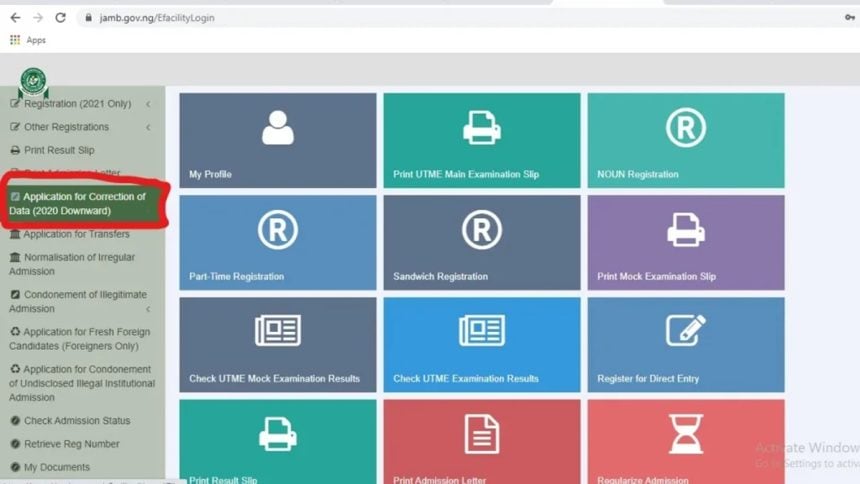
Step 2: Log In to the JAMB Correction Portal
Visit the official JAMB portal and log in using your registration number or email and password.
Step 3: Select the Correction Type
Choose the category you want to correct:
- Name correction
- Date of birth correction
Step 4: Provide Payment Details
Input your RRR number when prompted to verify payment.
Step 5: Enter Correct Information
Carefully enter the correct details as they appear on your official documents. Upload scanned copies of supporting documents if required. Accuracy at this stage is crucial, as mistakes can delay approval.
Step 6: Submit and Print the Slip
After reviewing your entries, submit the correction request and print the acknowledgement slip. This slip serves as proof that the correction request has been submitted.
Important Notes for Candidates
- Corrections are limited: Some sensitive personal details may only be corrected once per admission cycle, so candidates must ensure accuracy before submission.
- Verification may be required: For name and date of birth corrections, JAMB may request physical verification at a JAMB office or accredited CBT centre.
- Admission requirements remain unchanged: Correcting personal details does not guarantee admission. Candidates must still meet institutional cut-off marks and subject requirements.
- Keep all documents: Retain payment receipts, correction slips, and supporting documents for future reference.
By following these steps, candidates can ensure that their JAMB profiles are accurate, avoiding unnecessary complications during admission, registration, or NYSC mobilisation.