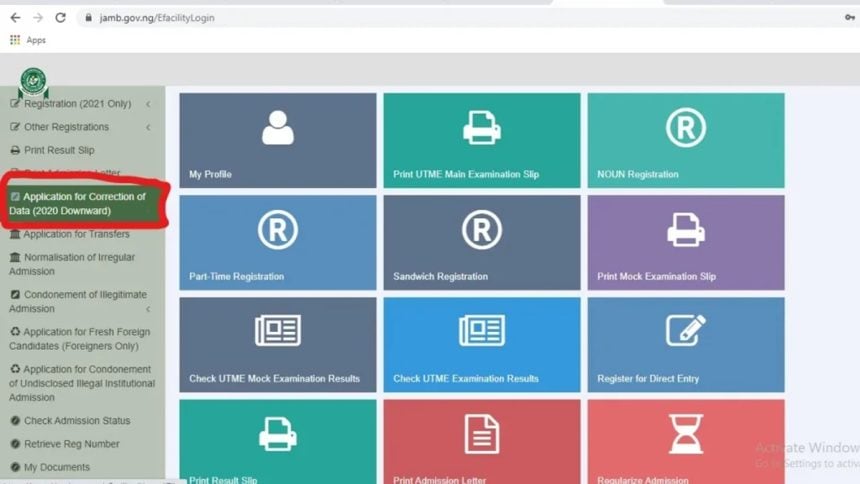
If you sat for the 2026 UTME and are waiting to know whether you have been offered a place in a Nigerian university, JAMB CAPS 2026 is the tool you need. JAMB CAPS — short for Central Admissions Processing System — is the official admission management platform operated by the Joint Admissions and Matriculation Board (JAMB). Every candidate who participated in the 2026 UTME must use CAPS to monitor, accept, or reject any admission offer. In this updated guide, we explain exactly what JAMB CAPS 2026 is, how to log in, what each admission status message means, and the steps you must take to secure your university place before the October 2026 deadline.
What Is JAMB CAPS 2026?
JAMB CAPS (Central Admissions Processing System) is an online portal that makes Nigerian university admissions transparent and verifiable. Introduced to eliminate fraud and double-admission scandals, CAPS allows:
- Candidates to view their admission status in real time
- Institutions to recommend or withdraw candidates
- JAMB to approve or disapprove admission offers
- Successful candidates to formally accept or reject their offers
Without completing the acceptance process on CAPS, your admission is not legally recognised by JAMB — even if the university has collected your acceptance fee.
Why JAMB CAPS Matters for the 2026 Admission Cycle
The 2026 UTME season was the most competitive in Nigerian history. A record 1.9 million candidates registered for the exam, and over 70 percent scored below the national minimum cut-off mark of 140. With university slots limited and cut-off marks rising sharply — the University of Lagos set its threshold at 200, while LASU (which attracted the highest number of first-choice applicants at 84,426) set its minimum at 195 — candidates need to act quickly the moment an admission offer appears on CAPS.
The 2026 admission deadline for public universities is 31 October 2026. Candidates who fail to accept their admission on CAPS before this date risk losing their offer entirely.
How to Login to JAMB eFacility Portal 2026 (Step-by-Step)
The JAMB eFacility portal (https://efacility.jamb.gov.ng) is the gateway to CAPS. Follow these steps carefully to log in and access your admission status.
Step 1: Open a Supported Browser
Use Google Chrome or Mozilla Firefox on a desktop or laptop. If you are on a mobile phone, switch your browser to Desktop Site mode before navigating to the portal — the mobile version may not display all CAPS features correctly.
Step 2: Go to the Official eFacility Portal
Type https://efacility.jamb.gov.ng into your browser address bar. Always verify the URL ends in .gov.ng — this confirms you are on the genuine government portal, not a phishing site. Scam sites impersonating JAMB are common; never enter your details on any site that does not carry the official .gov.ng domain.
Step 3: Enter Your Login Credentials
Click Login on the homepage. You will need your email address (the one you used when creating your JAMB profile) and your password (set during profile creation). Do not use your JAMB registration number here — the eFacility portal uses email and password, not registration number.
Step 4: Complete CAPTCHA Verification
If a CAPTCHA appears, complete it to confirm you are a human user. Then click the Login button to access your JAMB profile dashboard.
Forgot Your Password?
Click the “Forgot Password” link on the login page. JAMB will send a reset link to your registered email address. Check your spam or junk folder if the email does not arrive within a few minutes.
How to Check Your JAMB CAPS 2026 Admission Status
Once you are logged in to the eFacility portal, follow these steps to check your 2026 admission status:
- On your dashboard, locate and click “CAPS” or “Check Admission Status”
- Select your exam year (2026)
- Enter your JAMB Registration Number
- Click “Access My CAPS”
- Your current admission status will appear on the screen
Keep checking your CAPS status regularly — institutions update their decisions daily, and your status can change from “Recommended” to “Admitted” within 24–48 hours.
Understanding Your JAMB CAPS 2026 Status Messages
When you check CAPS, you will see one of several status messages. Here is what each one means and what action you should take:
“Admitted” — Take Action Now
Congratulations — JAMB has officially approved your admission. You must now proceed to accept the offer (see the next section). Do not delay: most institutions require you to pay your acceptance fee within a set number of days.
“Admission In Progress (AIP)”
Your chosen institution has submitted your name to JAMB for final approval and the process is ongoing. The status usually changes to “Admitted” once JAMB completes its review. No action is required yet — check back in 48–72 hours.
“Recommended”
Your institution has recommended you for admission and JAMB is currently cross-checking your subject combination, O’Level results, and UTME score to confirm they meet the programme requirements. This is a positive sign — JAMB is simply carrying out its verification checks. No immediate action is needed.
“Awaiting” or Blank Status
Your institution has not yet started processing admissions. Continue checking periodically. You can also visit your school’s admission portal directly to confirm whether they have commenced the exercise for your programme.
“Not Admitted”
Your application was not successful at the current institution. Do not panic — you may still be considered in subsequent admission batches, or you can explore the JAMB change of institution feature to try another school. Read our guide on JAMB Regularization 2026 for related information on correcting your JAMB record and improving your chances.
How to Accept Admission on JAMB CAPS 2026
Once your CAPS status reads “Admitted”, you must formally accept the offer. There are two approved methods:
Method 1: Accept via the CAPS Portal (Recommended)
- Log in to https://efacility.jamb.gov.ng
- Navigate to CAPS and access your admission status
- Click the “Accept Admission” button
- Confirm your decision on the next screen
Method 2: Accept via SMS
Send the word ACCEPT to 55019 or 66019 using the same phone number you registered with JAMB. You will receive a confirmation SMS once the process is complete.
Important: Accepting your admission on CAPS is compulsory. If you do not complete this step, your admission is not officially recognised by JAMB — even if you have paid school fees or received a physical admission letter from the institution.
How to Reject Admission on JAMB CAPS 2026
If you receive an admission offer you do not wish to accept — perhaps because you are waiting for a preferred institution or a different course — you can reject it on CAPS. This frees you up to be considered by other institutions that still have open admission slots.
Via Portal: Log in, navigate to CAPS, then click the “Reject Admission” button visible on your status page and confirm.
Via SMS: Send REJECT to 55019 or 66019 from your registered phone number.
Choose carefully — once you have accepted an admission, you can no longer be considered for admission to other institutions in the same 2026/2027 cycle.
JAMB CAPS 2026: Cut-Off Marks You Need to Know
Admission on CAPS is not only about whether your institution recommends you — your UTME score must also meet the institution’s minimum cut-off mark. For the 2026/2027 academic year, the official cut-off marks are:
| Institution Type | Minimum Cut-Off Mark |
|---|---|
| All universities (national minimum) | 140 |
| University of Lagos (UNILAG) | 200 |
| Obafemi Awolowo University (OAU) | 200 |
| University of Ibadan (UI) | 200 |
| Covenant University | 200 |
| Lagos State University (LASU) | 195 |
| Most federal universities | 180–200 |
| Polytechnics (federal and state) | 100 |
If your UTME score falls below your chosen institution’s cut-off, you will not receive an admission offer from that school, regardless of your O’Level grades. In such cases, consider applying to schools with lower thresholds, or begin planning for the 2027 UTME. Check out our guides on JAMB Biology 2026 and how to pass JAMB Use of English 2026 to improve your score in the next sitting.
Top 5 Most Competitive Universities for 2026 Admission
These universities received the highest number of first-choice applications in 2026, making admission especially competitive. If you applied to any of these schools, monitor your CAPS status closely and act immediately once you see “Admitted”:
- Lagos State University (LASU) — 84,426 first-choice applications; cut-off mark: 195
- University of Lagos (UNILAG) — 78,240 applications; cut-off mark: 200
- Obafemi Awolowo University (OAU) — 60,370 applications; cut-off mark: 200
- University of Ibadan (UI) — highly competitive; cut-off mark: 200
- University of Nigeria, Nsukka (UNN) — cut-off mark: 200
Key Deadlines for JAMB CAPS 2026 Admission
| Event | Deadline |
|---|---|
| Public university admission closes | 31 October 2026 |
| Private university admission closes | 30 November 2026 |
| Grace period to accept/reject offer on CAPS | Four weeks from offer date |
Do not wait until the deadline. Accept your admission as soon as it appears on CAPS to avoid missing your slot due to technical delays or portal downtime during the peak rush period.
Common JAMB CAPS 2026 Problems and How to Fix Them
Problem: “Invalid Login Details”
Solution: Ensure you are using your email address (not JAMB registration number) and your correct password. Use the Forgot Password link to reset if needed. Double-check for typos and ensure your Caps Lock is off.
Problem: Portal Shows Blank or Fails to Load CAPS
Solution: Switch to Chrome browser and enable Desktop Site mode on mobile. Clear your browser cache and cookies, then try again. Avoid logging in during peak hours (early morning usually offers the best portal speed).
Problem: “Admission Status Not Found”
Solution: Your institution may not have commenced admission processing yet. Check again in 48–72 hours. If the issue persists, log a complaint via the JAMB e-support portal at https://jamb.gov.ng.
Problem: Accept/Reject Buttons Are Not Showing
Solution: These buttons only appear when your status reads “Admitted”. If your status is still AIP or Recommended, wait for JAMB to complete its verification. If it has been more than two weeks with no change, contact JAMB’s helpline.
Once you have secured admission, don’t forget to prepare for your institution’s screening. Read our comprehensive guide to Post-UTME 2026 to understand what to expect and how to pass your university’s screening exercise.
Frequently Asked Questions About JAMB CAPS 2026
Q1: Is JAMB CAPS the same as the JAMB eFacility portal?
No, but they are closely connected. The eFacility portal (efacility.jamb.gov.ng) is the main login gateway for all JAMB online services, while CAPS is a specific module within that portal dedicated to managing admissions. You must log in to the eFacility portal to access CAPS.
Q2: Can I accept admission on CAPS without paying school fees first?
Yes. Accepting your admission on CAPS is a separate process from paying school fees or acceptance fees. You should accept the offer on CAPS as soon as your status reads “Admitted”, then follow your institution’s payment instructions and registration procedures afterwards.
Q3: What happens if I miss the deadline to accept admission on CAPS?
If you do not accept your admission on CAPS before the deadline (31 October 2026 for public universities), your admission offer may be cancelled and the slot reallocated to another candidate. Contact your institution’s admissions office immediately if you miss the deadline and request guidance on next steps.
Q4: Can I change my institution after accepting on CAPS?
No. Once you accept an admission on CAPS, you are committed to that institution and course for the 2026/2027 academic year. You cannot use the change-of-institution feature after you have already accepted. Think carefully before clicking Accept.
Q5: My CAPS shows “Admitted” but my school says I am not on their list. What do I do?
This discrepancy does occasionally occur. First, print your JAMB admission letter from the CAPS portal and visit your institution’s admissions office with the printout. If the issue is not resolved, log a formal complaint on the JAMB e-support portal at https://jamb.gov.ng or call the JAMB helpline.
Conclusion: Log In to JAMB CAPS 2026 and Secure Your Admission Today
JAMB CAPS 2026 is the only official platform for confirming your Nigerian university admission. Whether your status reads Admitted, AIP, Recommended, or something else entirely — knowing what each message means and when to act is the difference between securing your dream course and losing your university slot. Log in to https://efacility.jamb.gov.ng right now, check your admission status, and if you have been offered a place, accept it immediately. The 31 October 2026 deadline for public universities is non-negotiable.
📌 Bookmark SchoolInfoSpot.com for the latest updates on JAMB CAPS admission batches, cut-off mark reviews, Post-UTME screening dates, and all Nigerian university news — updated daily.




I can’t log in into my jamb caps because my email isn’t working again